Skip to content
View in the app

A better way to browse. Learn more.

Transgender Message Forum @ TGGuide.com

A full-screen app on your home screen with push notifications, badges and more.

To install this app on iOS and iPadOS
  1. Tap the Share icon in Safari
  2. Scroll the menu and tap Add to Home Screen.
  3. Tap Add in the top-right corner.
To install this app on Android
  1. Tap the 3-dot menu (⋮) in the top-right corner of the browser.
  2. Tap Add to Home screen or Install app.
  3. Confirm by tapping Install.

2 Comments

Recommended Comments

KarenPayne

Members

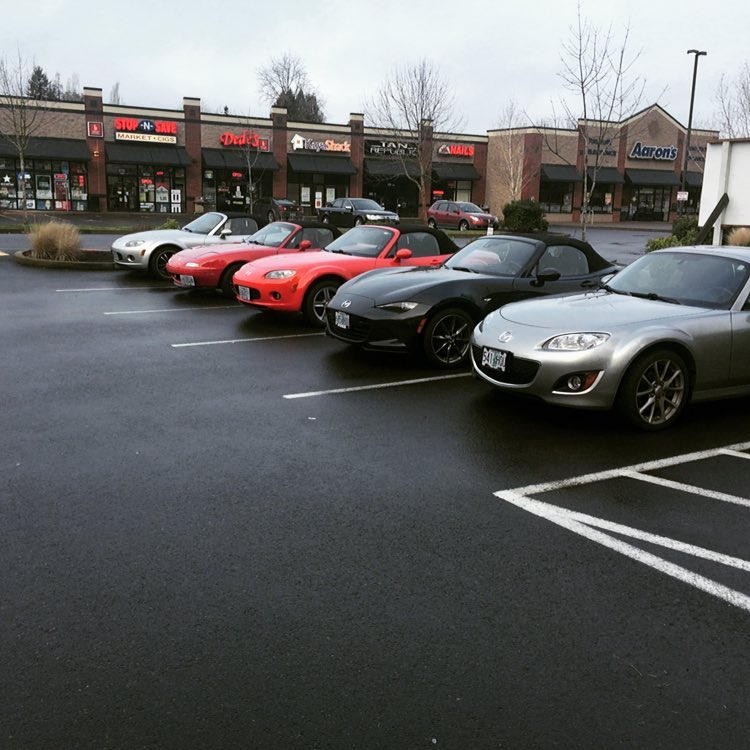
OK. Who has the LEAST amount of points left on they're license ? 


​We keep a low profile in regards to speed :)  It is really all about the curves for lead drivers such as me, the majority of the pack tend to get a tad left behind on some drivers which is why we use walkie talkies for the lead and trailing drivers.


Steph53

Members

Hiya Karen. That is a very nice line-up of Car's. I Am so glad that You get to enjoy Your drives out, on Saturday Morning's. It Is Not the speed that matters, just the sheer driving enjoyment instead. Using Walkie-Talkie's is an excellent idea. It Is almost 10 Year's since I had to stop driving, through health-problems, but, at one time. when I was working on early shift's only, I used to drive about 140 UK Miles, to somewhere that I used to enjoy going for My Lunch, which was a Home-Made Roast Dinner, Beef/Pork/Lamb with Fresh Vegetable's. I then had a 150 UK Miles Drive Home, afterwards. I did this usually 3 or 4 times a week ! This involved driving on main road's, and side road's, where I could stop, get out, and have a walk around, to enjoy some very lovely scenery. So I get Your enjoyment of Driving for fun, completely. Karen, I hope that You have very many Year's of Your driving enjoyment. Take Care, With My Very Best Wishes, Love Stephanie. xx 

Guest
Add a comment...

Account

Navigation

Search

Search

Configure browser push notifications

Chrome (Android)
  1. Tap the lock icon next to the address bar.
  2. Tap Permissions → Notifications.
  3. Adjust your preference.
Chrome (Desktop)
  1. Click the padlock icon in the address bar.
  2. Select Site settings.
  3. Find Notifications and adjust your preference.