Skip to content
View in the app

A better way to browse. Learn more.

Transgender Message Forum @ TGGuide.com

A full-screen app on your home screen with push notifications, badges and more.

To install this app on iOS and iPadOS
  1. Tap the Share icon in Safari
  2. Scroll the menu and tap Add to Home Screen.
  3. Tap Add in the top-right corner.
To install this app on Android
  1. Tap the 3-dot menu (⋮) in the top-right corner of the browser.
  2. Tap Add to Home screen or Install app.
  3. Confirm by tapping Install.

Updates

(0 reviews)

Update - 12/6/2016

To say that a lot has happened since I last posted is an understatement. I will post more later.

I am currently recovering from FFS surgery on Dec 2nd. I had a brow reduction & lift. Upper eyelid surgery, rhinoplasty, fat transfer to the cheeks. Chin reduction and shaping and tracheal shave. Tomorrow I have an appointment to hopefully take some of the stitches out and splint on my nose..

I have been off from work since Dec 1st and will be returning to work as Lisa on Dec 19th. I changed my name with the court and my name and gender marker on my SS card. In a few days, I will be going to the DMV and later the passport office to change my name and gender marker there as well.

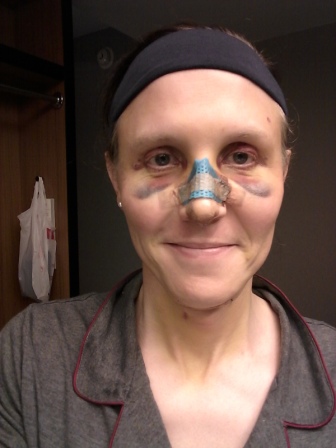
received_10209266836562534.jpeg

20161206_202611.jpg

2 Comments

Recommended Comments

LovelyLisa

Members

Thank you Emma! I am so excited and happy. Yes, Merry Christmas to me. This has been quite a journey for me.

Guest
Add a comment...

Account

Navigation

Search

Search

Configure browser push notifications

Chrome (Android)
  1. Tap the lock icon next to the address bar.
  2. Tap Permissions → Notifications.
  3. Adjust your preference.
Chrome (Desktop)
  1. Click the padlock icon in the address bar.
  2. Select Site settings.
  3. Find Notifications and adjust your preference.
