Skip to content
View in the app

A better way to browse. Learn more.

Transgender Message Forum @ TGGuide.com

A full-screen app on your home screen with push notifications, badges and more.

To install this app on iOS and iPadOS
  1. Tap the Share icon in Safari
  2. Scroll the menu and tap Add to Home Screen.
  3. Tap Add in the top-right corner.
To install this app on Android
  1. Tap the 3-dot menu (⋮) in the top-right corner of the browser.
  2. Tap Add to Home screen or Install app.
  3. Confirm by tapping Install.

4 Comments

Recommended Comments

MichelleLea

Members

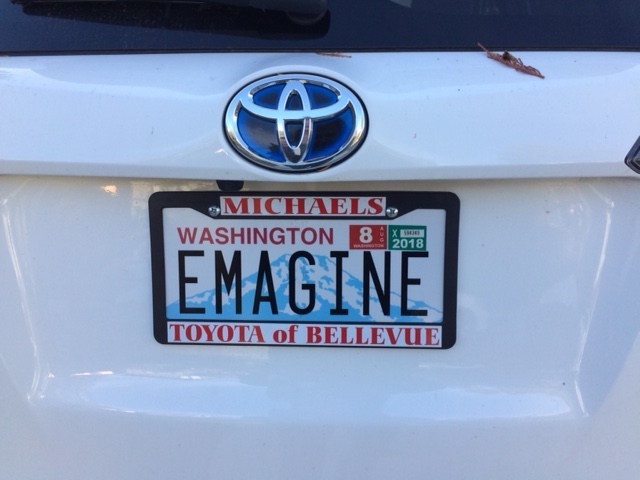
I love it too. I didn't know you were from Washington. I thought New York.

Thank you! I think it's too cool for school. This may sound silly but for me it's like another step in coming out and being authentically me, fun (I hope) and a little creative. 

No, I'm not from New York. I've only visited a handful of times. I'm a native Californian who moved to Seattle last summer. Washington is so amazing. Of course I hate the traffic but that encourages me to walk or use the light rail. On Saturday I drove less than an hour from my home to visit my niece and her young family who live on a small lake in a beautiful woodsy area. In California that drive would be a lot longer to get away from the urban areas. Another thing from Saturday: now I'm known as Aunt Emma! I'm very proud of that. 

MichelleLea

Members

Congratulations, Aunt Emma. You will be an amazing Auntie I know.

bluemoon

Members

Very clever, Emma... always finding new and creative ways, big and small, to continue becoming or bringing out the most real you.

Guest
Add a comment...

Account

Navigation

Search

Search

Configure browser push notifications

Chrome (Android)
  1. Tap the lock icon next to the address bar.
  2. Tap Permissions → Notifications.
  3. Adjust your preference.
Chrome (Desktop)
  1. Click the padlock icon in the address bar.
  2. Select Site settings.
  3. Find Notifications and adjust your preference.