
Skip to content
View in the app

A better way to browse. Learn more.

Transgender Message Forum @ TGGuide.com

A full-screen app on your home screen with push notifications, badges and more.

To install this app on iOS and iPadOS
  1. Tap the Share icon in Safari
  2. Scroll the menu and tap Add to Home Screen.
  3. Tap Add in the top-right corner.
To install this app on Android
  1. Tap the 3-dot menu (⋮) in the top-right corner of the browser.
  2. Tap Add to Home screen or Install app.
  3. Confirm by tapping Install.

Feeling good!

(0 reviews)

Today I was up and dressed as Dee in just under an hour, it is the first time in over a month that I have done my face and makeup and while I am out of practice I feel wonderful, last night I painted my toenails pink and then glossed my fingernails so they look kind of like a french manicure, but while these things have definitely made me feel happy I just feel different. Today is the first day in almost a year that I have not felt totally conflicted about my gender, this morning I actually feel like a woman. I don't know what it is or why, but I do.

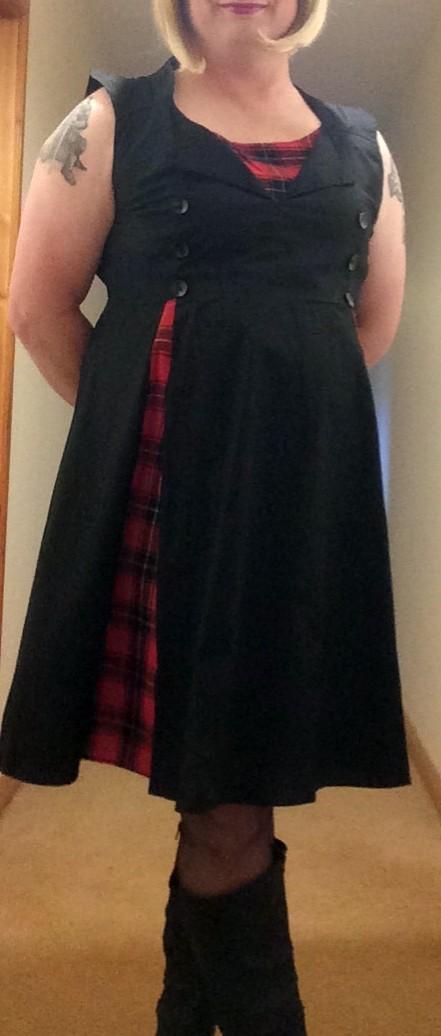
Also - I got a new dress and I love it! 💖817980426_Deetartandress.thumb.jpg.c6527f5bca860852465c9693bb4d7f43.jpg:) 
3 Comments

Recommended Comments

Jessicatoyou

Members

Enjoy your day!  You look great!🙋‍♀️

Dear Dee,

Love the color and cut of your dress . . . it looks Scottish, and flatters your waist and chest. 

You have great taste!

Your friend,

Monica

ScottishDeeDee

Members

Thanks Jess, and Monica, the tartan flashes are accentuated as I move so I could wear it on any night out, but at a Burns supper or ceilidh it would definitely fit right in. I think it would work well with proper doc martin type boots, and obviously I do not naturally fill the bust panel, but it is nice to get back to looking more like me! Am back to drab now but had a lovely day even though I did not go anywhere! 

Guest
Add a comment...

Account

Navigation

Search

Search

Configure browser push notifications

Chrome (Android)
  1. Tap the lock icon next to the address bar.
  2. Tap Permissions → Notifications.
  3. Adjust your preference.
Chrome (Desktop)
  1. Click the padlock icon in the address bar.
  2. Select Site settings.
  3. Find Notifications and adjust your preference.